When I do keyword research for a website, I don’t treat the keyword list as a list of articles to publish.
That’s one of the easiest ways to end up with dozens of URLs that target overlapping topics.
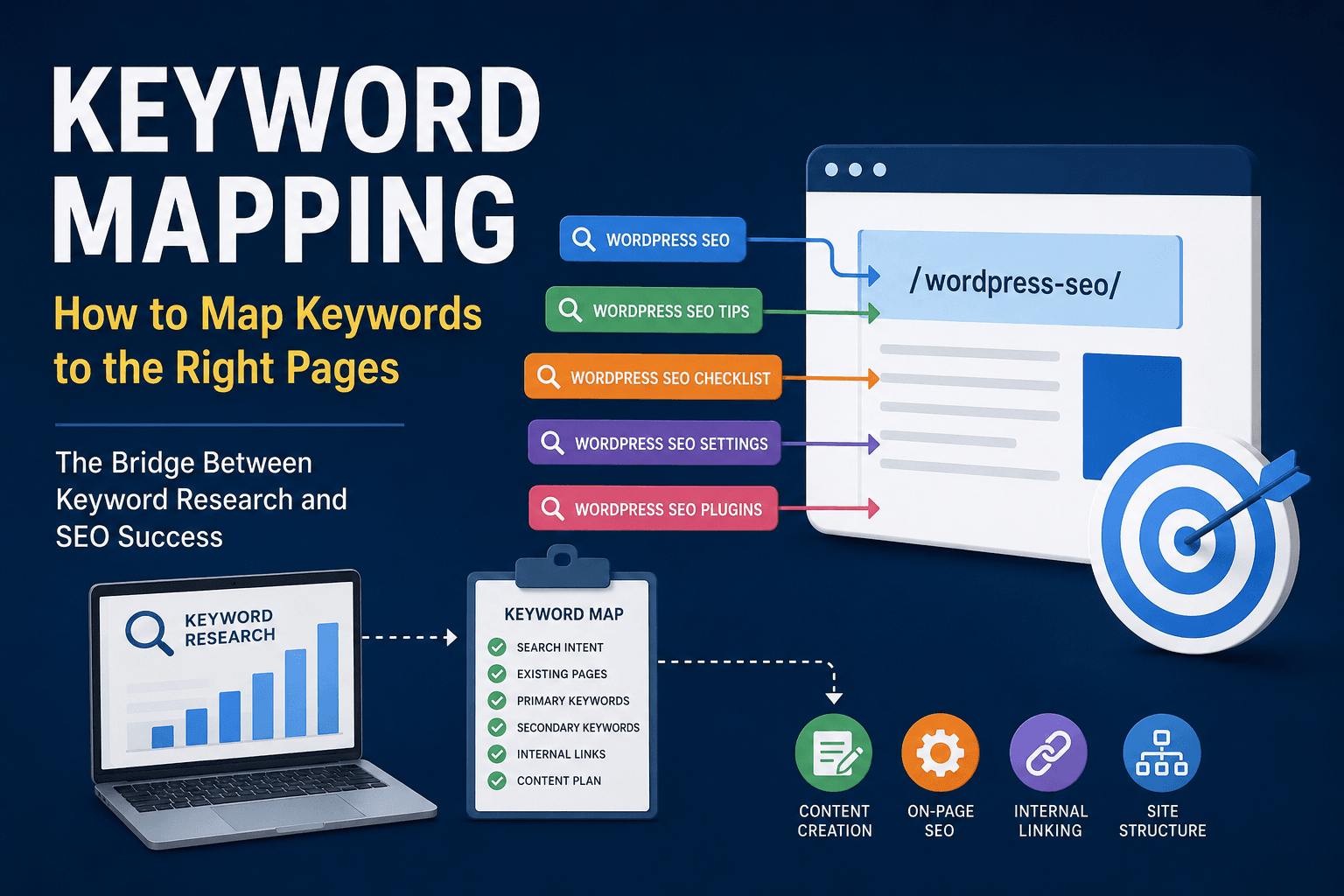
Keyword research tells me what people are searching for. Keyword mapping tells me where those searches should be handled on the website.
For me, keyword mapping is the step between keyword research and content planning. Before I decide to create a new page, I want to know:
- Does this keyword already have a suitable page?
- Is the search intent different from my existing content?
- Should this keyword be the primary keyword for a page?
- Should it simply be a secondary keyword or section?
- Does the SERP justify creating a separate URL?
- Could creating another page cause keyword cannibalization?
This is particularly important when working on WordPress websites, because it’s very easy to keep publishing articles around similar topics without realizing that several URLs are targeting essentially the same search intent.
A good keyword map gives me a clear relationship between:
keyword → search intent → target URL → content
And that makes the entire SEO strategy much easier to manage.
What Is Keyword Mapping?
Keyword mapping is the process of assigning target keywords to specific pages or URLs based on their search intent and relevance.
In simple terms, I’m deciding:
Which page on my website should rank for this keyword?
For example, let’s say I’m planning content for a WordPress SEO website and my research gives me these keywords:
- WordPress SEO
- WordPress SEO checklist
- WordPress SEO settings
- WordPress SEO tips
- WordPress SEO plugins
I wouldn’t automatically create five articles.
First, I’d look at the search intent behind each keyword and compare the SERPs.
A possible keyword map could look like this:
| Keyword | Search Intent | Target URL | Role |
| WordPress SEO | Informational | /wordpress-seo/ | Primary |
| WordPress SEO tips | Informational | /wordpress-seo/ | Secondary |
| WordPress SEO checklist | Informational | /wordpress-seo-checklist/ | Primary |
| WordPress SEO settings | Informational | /wordpress-seo-settings/ | Primary |
| WordPress SEO plugins | Commercial | /best-wordpress-seo-plugins/ | Primary |
The important thing here is that I don’t choose the URL simply because a keyword has search volume.
I choose the URL based on what the searcher is actually looking for and whether an existing page can already satisfy that intent.
Why Keyword Mapping Matters
Without keyword mapping, content planning can quickly become messy.
For example, imagine publishing:
- /wordpress-seo-guide/
- /wordpress-seo-tips/
- /wordpress-seo-strategy/
- /wordpress-seo-best-practices/
At first glance, these look like four different content ideas.
But if all four pages are essentially trying to answer:
“How do I improve SEO on my WordPress website?”
then I have probably created unnecessary overlap.
This is where keyword mapping becomes useful.
1. It gives every important keyword a home
Instead of having a spreadsheet full of keywords and no clear implementation plan, I can assign each important keyword to a specific URL.
That tells me where the keyword should actually be used.
2. It prevents unnecessary content creation
I don’t believe every keyword deserves its own URL.
If several keywords have the same search intent, I would generally rather build one stronger page that satisfies those searches than publish several thin or overlapping articles.
3. It helps reduce keyword cannibalization
When multiple URLs target the same or very similar intent, they can end up competing for visibility.
A keyword map helps me define the primary purpose of each URL before I create more content.
4. It improves internal linking
Once I know the purpose of each page, internal linking becomes much more logical.
For example:
WordPress SEO → WordPress SEO checklist → WordPress technical SEO
Each page has a distinct role, and the internal links help connect those related topics.
5. It turns keyword research into a content strategy
A keyword list tells me what people search for.
A keyword map tells me what I should actually do with those keywords.
That’s a much more useful output.
Instead of asking:
“What article should I write next?”
I can ask:
“Which important search intent isn’t properly covered by my existing website?”
That question usually leads to better content decisions.
Keyword Mapping vs. Keyword Research
I often see keyword research and keyword mapping treated as if they’re the same thing.
They’re not.
Keyword research is about discovering search terms and evaluating their potential.
Keyword mapping is about assigning those terms to the right pages.
I think about it like this:
Keyword research
What are people searching for?
Keyword mapping
Which page should answer that search?
For example, keyword research might produce:
- WordPress security
- WordPress security checklist
- WordPress security tips
- WordPress login security
- WordPress malware protection
The next step isn’t automatically to create five articles.
I need to determine whether those keywords represent:
- One broad search intent
- Several distinct intents
- Secondary topics
- Existing content opportunities
- Genuine content gaps
That’s why a large keyword list isn’t the same thing as an SEO content strategy.
How I Create a Keyword Map
My keyword-mapping process starts with the keyword data, but I don’t stop there.
I combine keyword metrics with the website’s existing URLs, search intent, and SERP analysis.
Step 1: Collect the keyword data
I start with my keyword research.
Depending on the project, this might include data from:
- Google Search Console
- Google Keyword Planner
- Ahrefs
- Semrush
- LowFruits
- Other keyword research tools
- Competitor research
I then organize the data in a spreadsheet.
At minimum, I want something like:
| Keyword | Search Volume | KD | Intent | Current URL | Target URL |
| keyword mapping | — | — | Informational | — | /keyword-mapping/ |
| keyword mapping tool | — | — | Commercial | — | /keyword-mapping-tools/ |
For a larger project, I can add:
- Current ranking
- Impressions
- Clicks
- CTR
- Organic traffic
- Priority
- Content status
- SERP notes
- Cannibalization risk
This gives me much more context than search volume alone.
Step 2: Check Existing URLs Before Creating Anything
This is one of the most important steps in my keyword-mapping process.
Before I create a new URL, I first check whether the website already has a page that can satisfy the search intent.
I review:
- Existing blog posts
- Pages
- Service pages
- Category pages
- Landing pages
- Product pages
- Older content
- Planned content
I can also use a Google search such as:
site:example.com keyword
But I don’t rely only on an exact keyword match.
I’m looking for intent coverage.
For example, suppose my keyword research produces:
“WordPress login security”
Before creating:
/wordpress-login-security/
I’d check whether I already have a WordPress security article that adequately covers login security.
If it does, I might simply add WordPress login security as:
- A secondary keyword
- An H2/H3 section
- A supporting topic
- An FAQ
- A contextual internal-link opportunity
I don’t need another URL just because I discovered another keyword.
However, if the SERP shows that “WordPress login security” has a substantially different intent and deserves dedicated coverage, then a separate page could make sense.
This is how I avoid turning a content plan into a collection of overlapping URLs.
Step 3: Group Keywords by Search Intent
After checking the existing content, I group keywords according to what the searcher is actually trying to accomplish.
For example:
- keyword mapping
- keyword mapping SEO
- SEO keyword mapping
- how to map keywords
These could potentially be handled by the same page because the underlying intent is very similar.
I could map them like this:
URL: /keyword-mapping/
Primary keyword:
keyword mapping
Secondary keywords:
- keyword mapping SEO
- SEO keyword mapping
- how to map keywords
- keyword mapping strategy
But I wouldn’t automatically do the same thing with:
keyword mapping tool
That keyword could have a stronger commercial/tool-focused intent.
It may deserve its own page depending on the SERP and the website’s strategy.
The goal isn’t to combine as many keywords as possible.
The goal is to group keywords that can realistically be satisfied by the same page.
How I Group Keywords by Search Intent
Search intent is one of the biggest factors I consider when mapping keywords.
A simple starting point is to classify keywords into four broad categories.
Informational Intent
The searcher wants to learn something.
Examples:
- what is keyword mapping
- how to do keyword mapping
- what is keyword cannibalization
These are generally suitable for guides, tutorials, and educational content.
Commercial Investigation
The searcher is researching a solution before making a decision.
Examples:
- best keyword mapping tools
- keyword mapping software
- best SEO keyword research tools
These may be better suited to comparison pages, reviews, or buying guides.
Transactional Intent
The searcher is ready to take an action.
Examples:
- buy SEO software
- WordPress SEO service
- hire WordPress SEO expert
These are generally better suited to service, product, or conversion-focused pages.
Navigational Intent
The searcher is looking for a particular website, brand, or resource.
Examples:
- Semrush login
- Google Search Console
- Yoast SEO
These generally aren’t normal informational content opportunities.
I Don’t Rely on Keyword Tool Intent Labels Alone
Keyword research tools are useful, but I don’t blindly accept their intent classification.
If a tool tells me a keyword is informational, I still want to see what Google is actually ranking.
I look at the SERP and ask:
- What type of pages are ranking?
- Are they tutorials?
- Long-form guides?
- Tools?
- Product pages?
- Service pages?
- Comparison articles?
- Category pages?
- Are the results answering one question or several related questions?
The SERP gives me real-world evidence of what Google currently considers relevant for that query.
This becomes particularly important when I’m deciding whether two keywords should share one URL or deserve separate pages.
How I Assign Keywords to Existing URLs
One of the biggest mistakes I see in SEO content planning is assuming:
New keyword = new page
That’s not how I approach keyword mapping.
Suppose I already have:
/wordpress-seo/
And I discover:
- WordPress SEO tips
- WordPress SEO best practices
- WordPress SEO techniques
- WordPress SEO checklist
I wouldn’t immediately create four new URLs.
First, I’d compare the search intent and SERPs.
If /wordpress-seo/ can already satisfy the intent behind those searches, I can map the related keywords to that existing URL.
They might become:
- Secondary keywords
- H2/H3 topics
- Supporting sections
- FAQs
- Internal-link opportunities
For example:
Existing URL: /wordpress-seo/
Primary keyword:
WordPress SEO
Secondary keywords:
- WordPress SEO tips
- WordPress SEO best practices
- WordPress SEO techniques
However, if I find that “WordPress SEO checklist” has a distinct SERP dominated by checklist-style resources, then I might create:
/wordpress-seo-checklist/
The decision isn’t based on keyword volume alone.
It’s based on search intent + SERP overlap + existing content.
When Should I Create a New Page?
I create a new page when the keyword represents a meaningfully different search intent or topic that my existing URLs don’t adequately satisfy.
Here are the situations I look for.
1. The searcher wants a different type of answer
For example:
WordPress SEO
versus:
best WordPress SEO plugins
The first is broad and informational.
The second has commercial investigation intent.
Those are potentially different pages because the searcher needs a different type of result.
2. The SERPs are substantially different
If Google is ranking different types of pages for two keywords, that’s a strong signal that the search intents may be different.
For example, if one SERP is dominated by tutorials while another is dominated by comparison pages, I wouldn’t automatically force both keywords onto the same URL.
3. The topic deserves standalone coverage
Sometimes a topic is simply too important or comprehensive to bury inside another article.
If covering it properly would make the existing page unnecessarily broad or unfocused, a dedicated URL may be better.
4. The page has a clear role in the site architecture
Every new URL should have a reason to exist.
Before creating one, I ask:
What search intent does this page satisfy that another page on my website doesn’t?
If I can’t answer that clearly, I probably don’t need another URL.
How Keyword Mapping Helps Prevent Cannibalization
Keyword cannibalization becomes a concern when multiple pages target the same or very similar search intent.
For example:
- /wordpress-seo-guide/
- /wordpress-seo-tips/
- /wordpress-seo-strategy/
If all three pages are essentially trying to rank for WordPress SEO, there’s a clear possibility of unnecessary overlap.
A keyword map helps me define a primary purpose for each URL.
I might structure the website like this:
| URL | Primary Topic |
| /wordpress-seo/ | WordPress SEO |
| /wordpress-seo-checklist/ | WordPress SEO checklist |
| /wordpress-seo-plugins/ | WordPress SEO plugins |
| /wordpress-technical-seo/ | WordPress technical SEO |
Now each page has a more distinct role.
Similar keywords don’t automatically mean cannibalization
This is important.
Two pages can rank for some of the same queries without necessarily being duplicates.
Google can rank one page for dozens or even hundreds of related keyword variations.
So I don’t look at keyword overlap alone.
The question I care about is:
Are these pages targeting the same search intent?
If yes, I investigate whether they should be consolidated or repositioned.
If no, separate pages can make perfect sense.
Keyword Mapping Example
Let’s take a simplified WordPress SEO website.
Suppose my keyword research produces:
| Keyword | Intent | Existing Page? | Decision |
| keyword mapping | Informational | No | Create page |
| how to map keywords | Informational | No | Map to /keyword-mapping/ |
| keyword mapping SEO | Informational | No | Map to /keyword-mapping/ |
| keyword mapping tool | Commercial | No | Evaluate separate page |
| keyword cannibalization | Informational | Yes | Keep as separate topic |
| keyword research | Informational | Yes | Keep existing page |
| SEO keyword research | Informational | Yes | Map to keyword research page |
My resulting structure could be:
/keyword-mapping/
Primary:
keyword mapping
Secondary:
- how to map keywords
- keyword mapping SEO
- SEO keyword mapping
/keyword-research/
Primary:
keyword research
/keyword-cannibalization/
Primary:
keyword cannibalization
The important thing isn’t the spreadsheet itself.
The important thing is that every URL has a clearly defined job.
My Keyword Mapping Template
For a basic project, I can manage keyword mapping in Google Sheets or Excel.
My core columns would look something like this:
| Keyword | Search Volume | KD | Intent | Existing URL | Target URL | Primary/Secondary | Status |
| keyword mapping | — | — | Informational | — | /keyword-mapping/ | Primary | Planned |
| how to map keywords | — | — | Informational | — | /keyword-mapping/ | Secondary | Planned |
| keyword mapping SEO | — | — | Informational | — | /keyword-mapping/ | Secondary | Planned |
| keyword mapping tool | — | — | Commercial | — | /keyword-mapping-tools/ | Primary | Research |
For a larger website, I’d add:
- Current ranking
- Impressions
- Clicks
- CTR
- Organic traffic
- Content type
- Content status
- Publication date
- Last updated
- Internal links
- Parent topic
- Cannibalization risk
- Priority
- SERP notes
This turns the keyword map into much more than a keyword list.
It becomes a content planning and URL management system.
Common Keyword Mapping Mistakes
1. Creating one page for every keyword
This is probably the easiest mistake to make.
If five keywords have essentially the same intent, creating five separate pages can create unnecessary overlap.
I’d rather determine whether one comprehensive page can satisfy those searches.
2. Ignoring existing content
Before creating a new URL, I always want to know what already exists.
A keyword doesn’t have to appear exactly in an existing page’s title for that page to be relevant.
The better question is:
Does my website already have a page that satisfies this search intent?
If yes, the existing page deserves consideration before creating another one.
3. Mapping keywords based only on search volume
Search volume is useful, but it shouldn’t decide the URL structure.
I also consider:
- Search intent
- SERP competition
- Topical relevance
- Existing content
- Website authority
- Business value
- Content architecture
A high-volume keyword isn’t automatically a new-page opportunity.
4. Treating keyword difficulty as the deciding factor
Keyword difficulty can help me prioritize opportunities, but it doesn’t tell me whether two keywords belong on the same page.
Two low-KD keywords may have exactly the same intent.
And a high-volume keyword may make more sense as a supporting topic on an existing authoritative page.
5. Ignoring the SERP
Keyword tools provide useful data.
But when I’m deciding whether two keywords deserve separate URLs, I want to look at the actual search results.
The SERP can tell me whether Google sees the queries as substantially different.
6. Creating new URLs unnecessarily
If an existing page already has rankings, impressions, backlinks, and useful content, I don’t want to create another URL simply because I found a new keyword variation.
First, I’d ask whether the existing page can be improved to cover that intent.
7. Forgetting internal links
Keyword mapping should influence internal linking as well.
If /keyword-mapping/ is my main page about keyword mapping, related articles should link to it naturally where relevant.
The keyword-mapping page can also link to related topics such as:
- Keyword research
- Search intent
- Keyword cannibalization
- On-page SEO
- Internal linking
This helps establish clear topical relationships throughout the website.
My Keyword Mapping Workflow for WordPress
If I’m doing keyword mapping for a WordPress website, this is the workflow I’d follow:
1. Export the keyword data
Collect keywords from keyword research tools and Google Search Console.
2. Build a URL inventory
List the important existing:
- Posts
- Pages
- Categories
- Service pages
- Landing pages
3. Check existing coverage
For every keyword opportunity, ask whether an existing URL already satisfies the intent.
4. Group keywords by intent
Combine closely related keywords that can realistically be satisfied by the same page.
5. Analyze the SERPs
Compare the ranking pages for the important keywords.
6. Identify genuine content gaps
Only create a new URL when an important search intent isn’t adequately covered.
7. Assign one primary topic to each URL
Use related keywords as secondary terms where appropriate.
8. Plan internal links
Connect related pages based on their roles within the site’s topic structure.
9. Publish or update
Create new content where there is a genuine gap and improve existing content where appropriate.
10. Review the map regularly
Keyword mapping isn’t something I consider finished after publishing an article.
As a website grows, new content can introduce overlap.
I periodically review rankings, Search Console data, and the site’s URL structure to identify pages that may need to be:
- Expanded
- Consolidated
- Redirected
- Repositioned
- Internally linked more effectively
FAQ
What is keyword mapping in SEO?
Keyword mapping is the process of assigning target keywords to specific website URLs based on search intent and relevance. It helps determine which keywords should be primary targets, which should support existing pages, and when a new page is actually necessary.
Why is keyword mapping important?
Keyword mapping helps organize a website around distinct search intents. It can reduce unnecessary content, improve internal linking, clarify URL structure, and help reduce the risk of multiple pages competing for similar searches.
Should every keyword have its own page?
No.
Several closely related keywords can often be targeted with the same page when they have the same search intent. I create a separate page when the keyword represents a sufficiently different topic or intent.
How do I map keywords to existing pages?
Start by reviewing your existing URLs and determine whether each page already satisfies the search intent behind the keyword.
If it does, map the keyword to that URL instead of automatically creating a new page.
What is the difference between keyword research and keyword mapping?
Keyword research identifies the terms people search for.
Keyword mapping determines which pages on your website should target those terms.
Does keyword mapping prevent keyword cannibalization?
It can help reduce the risk of cannibalization by giving each URL a clearly defined primary topic and search intent.
However, I wouldn’t diagnose cannibalization simply because two pages rank for similar keywords. I would look at the pages, their intent, rankings, and SERP overlap before deciding what action to take.
Should I use the exact keyword in the URL?
Not necessarily.
I prefer URLs that are short, descriptive, readable, and aligned with the page’s main topic.
There is no need to create an awkward URL just to include every keyword variation.
Final Takeaway
For me, keyword mapping is where keyword research becomes an actual SEO strategy.
A keyword list tells me what people search for.
A keyword map tells me what my website should do about those searches.
My basic process is:
Research keywords → check existing URLs → group by intent → analyze SERPs → assign keywords → create only necessary pages → build internal links → monitor performance
The biggest lesson is simple:
Don’t create a new URL just because you found a new keyword.
First check whether an existing page already satisfies that search intent.
If it does, improve or expand the existing page.
If it doesn’t, and the SERP shows a genuine opportunity for a distinct topic, then a new URL may be justified.
That’s how I use keyword mapping to build a cleaner WordPress site, avoid unnecessary content overlap, and create a more intentional SEO content structure.